Edit and playtest an existing Godot game with Codex
Open a Godot project in Ryuo Studio, connect Codex, and test a GDScript change against the same input. See the before-and-after footage from Boogie Board.
You can use Codex in Ryuo Studio to change GDScript in a game you already have and play it in Godot. In our bodyboarding game Boogie Board, pressing Space a little too early sent the rider tumbling. We changed one number and replayed the same wave. A dive that previously wiped out earned 100 points.
Connect Codex to your Godot project
Use a game you already have, or download the duck-dive starter project (ZIP) and unzip it. The starter is a small 2D exercise with the scoring windows from Boogie Board. It runs without external assets.
- In the Ryuo desktop app, choose + beside Games, then Browse folder. Pick the folder containing
project.godotand select Open game. If setup asks you to close Godot so it can enable the editor addon, close it and finish setup. - In the Godot tab, select Launch Godot. Wait for Live editor to turn green. Ryuo supports standard Godot 4.5 and newer. Its script checks cover GDScript. Godot setup and limitations
- Choose Codex beside the chat. If prompted, choose Install Codex and sign in with your ChatGPT account. Chat runs against your provider allowance. A GDScript edit and local playtest don’t require buying Ryuo generation credits. Choosing and signing in to an assistant
Ask for one observable change
For Boogie Board, two timings matter. A clean dive gets the rider under the crest. A more precisely timed dive earns a perfect score. Here’s a prompt you can adapt to a mechanic in your own game:
While paddling out, give me an extra 0.15 seconds to clear a wave if I press Space early. Keep the perfect-dive bonus, cooldown and animation length as they are. Show me the GDScript diff. Play the same wave with the same input before and after, and report the points and whether the rider wiped out.
In scripts/player.gd, the game checks how long the rider has been diving when the crest passes. The edit changes the upper limit of the clean-dive window:
- if dive_age >= 0.15 and dive_age <= 1.0:
+ if dive_age >= 0.15 and dive_age <= 1.15:
The rider still dives for 1.25 seconds. The perfect window still runs from 0.35 to 0.75 seconds. Changing the animation length would have made the rider stay underwater longer without fixing the scoring rule.
Replay the same input
We tested a copy of Boogie Board directly in Godot 4.7.2. We fixed the ocean’s random seed, started each run at the same position and sent one Space press on a chosen physics tick. At 60 physics ticks per second, the first crest reached the rider 5.23 seconds into each run. These are the game’s results across six runs:
| Time from Space press to crest | Original game | After the edit |
|---|---|---|
| 0.58 seconds | Perfect dive, 250 points | Perfect dive, 250 points |
| 1.08 seconds | Wipeout, 0 points | Clean dive, 100 points |
| 1.18 seconds | Wipeout, 0 points | Wipeout, 0 points |
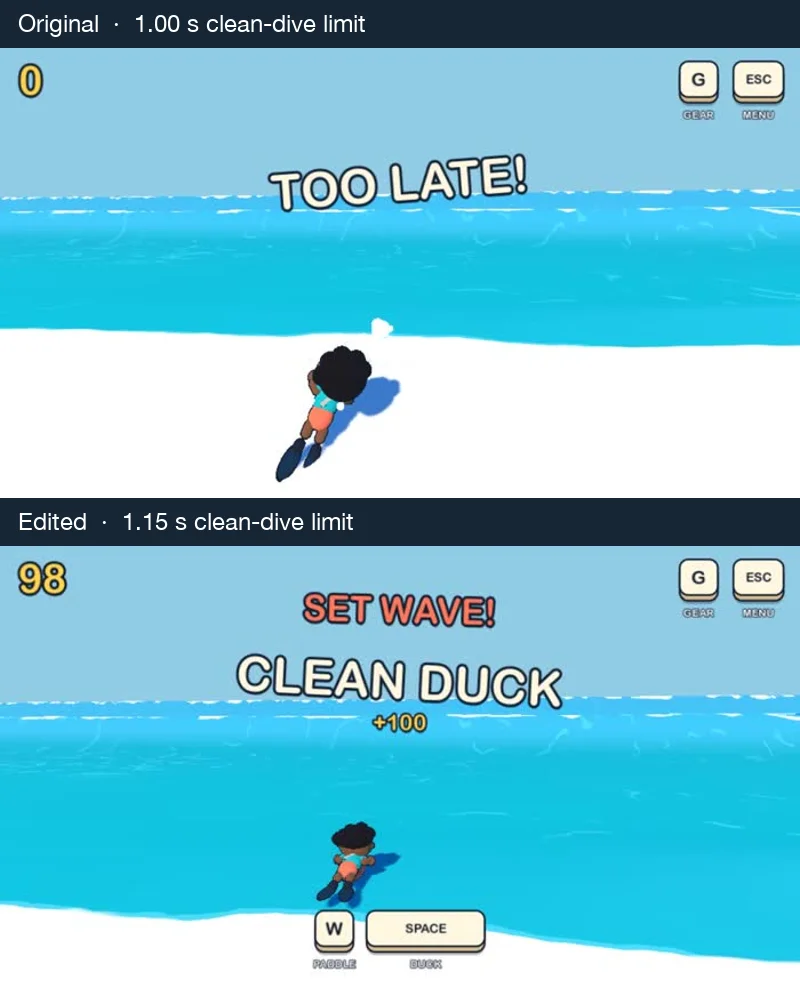
Watch the two runs at the same input timing (6-second video) · See Boogie Board gameplay
Try it in the starter project
Choose Play in the Godot tab. Press R to start a wave and Space to duck as it approaches the yellow board. For an exact comparison, press 2. The game starts a fresh wave and automatically dives 65 physics ticks before the crest. It should show Wipeout +0.
Ask Codex: “In wave.gd, extend the clean-dive limit from 1.0 to 1.15 seconds. Keep the perfect window and replay inputs the same. Run replays 1, 2 and 3 and report the results.” Play again and press 2. You should now see Clean dive +100. 1 should still earn 250 points, and 3 should still wipe out. All three results also appear in Godot’s Output panel.
For your own game, pick one input that should now succeed, one that already succeeds, and one that should still fail. Give Codex the starting scene, input and observable result for each. If the level uses random waves, enemies or items, repeat the same seed. Ask it to show the score, collision, or on-screen result from the running game so you can check each outcome yourself.